Showing posts with label EVALUATE. Show all posts

Wednesday, August 13, 2008

OBIEE Children of the level / Converting rows to strings

1 Preface
Consider the following table:
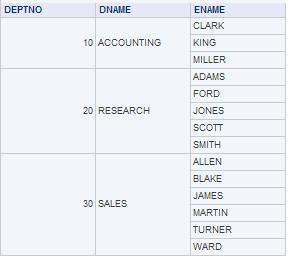

But what you really want is this:

Or even better sorted alphabetically

This document describes how you can achieve this in OBIEE against an Oracle DB

2 Stragg function
This solution is based on Tom Kite’s original String Aggregation function found here:
http://www.sqlsnippets.com/en/topic-11591.html

To implement this function in OBIEE your first have to bring the function to the database. Either in the data-schema or in your custom OBIEE function schema. If you do the later be sure that the OBIEE function schema has direct select rights granted on the data-schema tables and views. Grant an execute on the STRAGG function to public. It’s also very handy to create a public SYNONYM for the STRAGG function. (CREATE PUBLIC SYNONYM STRAGG FOR SCHEMA_NAME.STRAGG;)

2.1 The STRAGG scripts

2.1.1 The STRAGG object

create or replace type stragg_type as object
(
string varchar2(4000),

static function ODCIAggregateInitialize
( sctx in out stragg_type )
return number ,

member function ODCIAggregateIterate
( self in
out stragg_type ,
value in varchar2
) return number ,

member
function ODCIAggregateTerminate
( self in stragg_type,
returnvalue out
varchar2,
flags in number
) return number ,

member function
ODCIAggregateMerge
( self in out stragg_type,
ctx2 in stragg_type
)
return number
);
/

2.1.2 The STRAGG type body

create or replace type body stragg_type
is

static
function ODCIAggregateInitialize
( sctx in out stragg_type )
return
number
is
begin

sctx := stragg_type( null ) ;

return
ODCIConst.Success ;

end;

member function ODCIAggregateIterate
( self in out stragg_type ,
value in varchar2
) return number
is
begin

self.string := self.string ',' value ;

return
ODCIConst.Success;

end;

member function ODCIAggregateTerminate
( self in stragg_type ,
returnvalue out varchar2 ,
flags in number
) return number
is
begin

returnValue := ltrim( self.string,
',' );

return ODCIConst.Success;

end;

member function
ODCIAggregateMerge
( self in out stragg_type ,
ctx2 in stragg_type
)
return number
is
begin

self.string := self.string
ctx2.string;

return ODCIConst.Success;

end;

end;
/

2.1.3 The STRAGG function

create or replace function stragg
( input varchar2 )
return varchar2
deterministic
parallel_enable
aggregate using stragg_type
;
/
3 OBIEE Usage
These function work both from the repository as directly from the reports.
3.1 Unsorted

EVALUATE_AGGR( 'STRAGG(%1)' as varchar(200), EMP.ENAME)

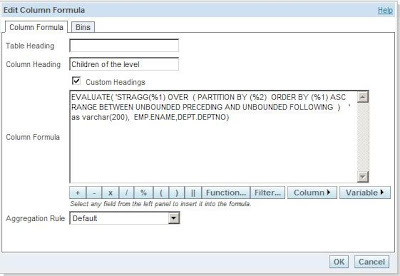
3.2 Sorted


EVALUATE( 'STRAGG(%1) OVER ( PARTITION BY (%2) ORDER BY (%1) ASC RANGE BETWEEN UNBOUNDED PRECEDING AND UNBOUNDED FOLLOWING ) ' as varchar(200), EMP.ENAME,DEPT.DEPTNO)

3.3 Distinct
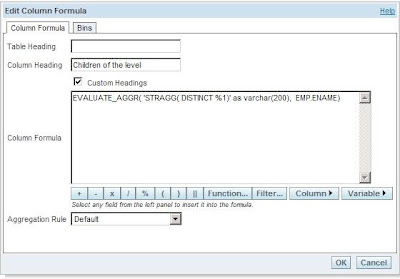
EVALUATE_AGGR( 'STRAGG( DISTINCT %1)' as varchar(200), EMP.ENAME)

Till Next Time

This article was original written for the Ciber knowledge Blog:
http://knowledge.ciber.nl/weblog/?p=125

Wednesday, January 16, 2008

OBIEE IsNumeric

I was searching for an 'IsNumeric' function in OBIEE and couldn't find it so I wrote two alternatives. If anybody has better suggestions feel free to report them!

(the report builders didn't have the proper authorisation to make there own dbFunctions)

Version 1 (all OBIEE):

CASE WHEN
LENGTH(TRIM(REPLACE(REPLACE(REPLACE(REPLACE(REPLACE(REPLACE(REPLACE(REPLACE(REPLACE(REPLACE(REPLACE(REPLACE(REPLACE(TBLTRUCKS.LICENSEPLATE,'1','
'),'2', ' '),'3', ' '),'4', ' '),'5',' '),'6', ' '),'7',' '),'8',' '),'9','
'),'0',' '),'+',' ' ),'-',' '),'.',' '))) <> 0 THEN 'Non-Numeric' ELSE
'Numeric' END

Version 2 (Doing it on the database):


CASE WHEN EVALUATE('LENGTH(TRIM(TRANSLATE(%1,%2,%3)))' AS DOUBLE PRECISION,
TBLTRUCKS.LICENSEPLATE, '+-.0123456789', ' ' ) IS NULL THEN 'Numeric' ELSE
'Non-Numeric' END

Until next time....

Friday, December 7, 2007

OBIEE EVALUATE_AGGR Function

In the documentation for OBIEE 10.3.3.1 you find a very small description of the EVALUATE_AGGR function:

6.2 EVALUATE_AGGR Function
This function is intended for aggregate functions
with group by clause.
Syntax: EVALUATE_AGGR('DB_Aggregate_Function(%1)',
{comma separated Expression})
Example: SELECT year.year, sales.qtysold, EVALUATE_AGGR('sum(%1)', sales.quantity) From SnowFlakeSales;


This function is very useful if you want to use the build in statistics functions from the ORACLE database like:

  • CORR
  • COVAR_POP
  • STDDEV_POP

The following example calculates the coefficient of correlation between the list prices and minimum prices of products by weight class in the sample view oe.products:SELECT weight_class, EVALUATE_AGGR('CORR(%1,%2)' as double, product_information.list_price, product_information.min_price)
FROM product_information;

If you get a "[38083] The Attribute defines a measure using an obsolete method." error, check whether you set the Aggregation Rule of the logical column correctly.

Good info can also be found here:

http://www.oracle.com/technology/products/bi/pdf/Oracle%20Business%20Intelligence%20Server%20and%20Embedded%20DB%20Functions.pdf


OBIEE EVALUATE Function

In the documentation for OBIEE 10.3.3.1 you find a very small description of the EVALUATE function:


6.1 EVALUATE Function
This function is intended for scalar and analytic
calculations.
Syntax: EVALUATE('DB_Function(%1)', {
Comma separated Expression})
Example: SELECT
e.lastname,sales.revenue,EVALUATE('dense_rank()
over(order by %1
)',sales.revenue) FROM sales s, employee e;

As often in practice the real world is more complex:
Good practice is to tell the EVALUATE function which type of return value it can expect:
EVALUATE('DB_Function(%1)' as returntype, {Comma separated Expression}). If you omit this it might sometimes complain that it can't concatenated values from a different type.

Another trap is when you use columns from several tables for the input variables, be sure that they have a direct join. Else OBIEE will try to join them underwater which can lead to unwanted Cartesian products.

Wednesday, December 5, 2007

OBIEE EVALUATE function and presentation variables

I have this function defined in a report:
evaluate('bi_server.fnc_XXX_l_ind (%1,%2)' as varchar(250),@{MACHINEID}{'1234'}
,@ {PTESTCODE}{'X56GH'})

both %1 and %2 are varchar

When I put the report in a dashboard and try to fill the presentation values the report comes back with:

[nQSError: 27005] Unresolved column: "X56GH". (HY000)

The reason for this error is that is't trying to use the column "X56GH" instead of the string "X56GH".

The solution is to put single quotes around the presention variables:
evaluate('bi_server.fnc_XXX_l_ind (%1,%2)' as varchar(250),'@{MACHINEID}{1234}','@{PTESTCODE}{X56GH}')

But not around the default values!