One of the power features of OBIEE is the usage of federated or fragmented query's. Being able to source different database at the same time can save you a lot of time because you don't have to reengineer your whole ETL every time a new system gets introduced.
Still it wise to put some effort in the way you map the tables in the repository, especially if you want to minimize the query response time.
Let's go back to out basic model:


As you can see this table only contains data after 2008. The data before 2008 is in the "old" database.
Making a federated / fragmented logical table
Step 1 import the "old" fact table into physical layer of the repository:

Step 2 make the correct joins in the Physical Layer

Step 3 Add the "old" table to the datasource of the logical table


Step 4 Fragment the data from the two sources:


Don't forget to set levels:

And even more important to enable the fragmentation:

It's good practice to also set the where clause(s):

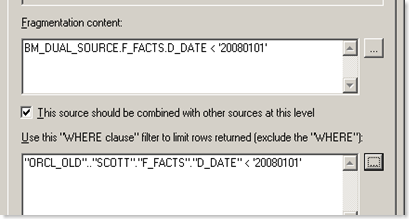
Why?
During transaction from the "old" to a "new" system there is usually a grace period where both systems are kept up to date, if we don't "restrict" this "grace period" the numbers might not add up correctly.
Let's have a look at the result:

Optimizing the fragmentation
If we take a look at log of the previous query:
-------------------- Sending query to database named ORCL (id: <<8216>>):
select T46.LEVEL_01 as c1,
T46.LEVEL_05 as c2
from
DIM_LEVEL_05 T46
order by c2
+++Administrator:2d0000:2d0001
-------------------- Sending query to database named ORCL (id: <<8233>>):
select T26.D_YEAR as c1,
T26.D_YEAR_MONTH_DAY as c2
from
DIM_YEAR_MONTH_DAY T26
order by c2
+++Administrator:2d0000:2d0001
-------------------- Sending query to database named ORCL_OLD (id: <<8250>>):
select T1220.F_FACT_VAL as c1,
T1220.D_DATE as c2,
T1220.LEVEL_5 as c3
from
F_FACTS T1220
where ( T1220.D_DATE < '20080101' )
order by c2
+++Administrator:2d0000:2d0001
-------------------- Sending query to database named ORCL (id: <<8165>>):
select D0.c3 as c2,
D0.c2 as c3,
sum(D0.c1) as c6
from
(select T31.F_FACT_VAL as c1,
T26.D_YEAR as c2,
T46.LEVEL_01 as c3
from
DIM_LEVEL_05 T46,
DIM_YEAR_MONTH_DAY T26,
F_FACTS T31
where ( T26.D_YEAR_MONTH_DAY = T31.D_DATE and T31.LEVEL_5 = T46.LEVEL_05 and T31.D_DATE >= '20080101' )
) D0
group by D0.c2, D0.c3
You will see that the "old" data isn't picked up very efficiently. OBIEE fires three separated query's to the database and "stitches and summarizes" the data locally, while the "new" data is summarized at the database.
Use the database potential
OBIEE is NOT a database!
So all data manipulation / aggregation we can do at the database side is usually faster then bringing the data over to the BI-server. If the fact are in the "old" system then there is a big changes that it also contains the dimensions. If not ask your DBA to make a copy to that database either physical or as a view based on a database link.
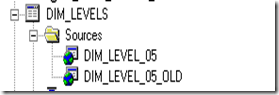
We can import and map the "old" dimensions the same way as the "old" fact table.

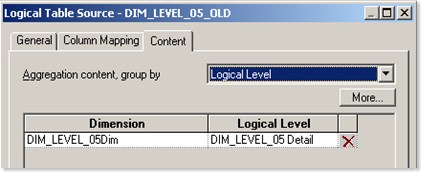
Don't forget to set the levels:
Let's try a "border" line query:


From the log:
+++Administrator:2d0000:2d0003
-------------------- Sending query to database named ORCL_OLD (id: <<9994>>):
select T1220.F_FACT_VAL as c1,
T2134.LEVEL_01 as c2,
T1220.D_DATE as c3
from
DIM_LEVEL_05 T2134,
F_FACTS T1220
where ( T1220.LEVEL_5 = T2134.LEVEL_05 and T1220.D_DATE < '20080101' )
order by c3
+++Administrator:2d0000:2d0003
-------------------- Sending query to database named ORCL_OLD (id: <<9868>>):
select T2140.D_YEAR as c1,
T2134.LEVEL_01 as c3,
sum(T1220.F_FACT_VAL) as c5
from
DIM_LEVEL_05 T2134,
DIM_YEAR_MONTH_DAY T2140,
F_FACTS T1220
where ( T1220.D_DATE = T2140.D_YEAR_MONTH_DAY and T1220.LEVEL_5 = T2134.LEVEL_05 and T1220.D_DATE < '20080101' and (T2140.D_YEAR in ('2007', '2008')) )
group by T2134.LEVEL_01, T2140.D_YEAR
Nicely split into two non overlapping query's.
Till Next Time
This article is originally written for the Ciber knowledge blog.


