When you are working on a MUD or Multi User Development RPD you can set some extra options.
In the MUD directory create a new option file for each master repository. It’s a TXT file called [RPD_NAME].opt fi: paint.opt. (be aware CaseSensitive!)
Set the properties of the file to hidden:

open the file in a text editor:
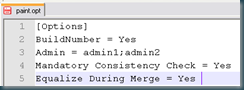
Add the following (INI style):
[Options]
BuildNumber = Yes
Admin = admin1;admin2
Mandatory Consistency Check = Yes
Equalize During Merge = Yes

| Option | Description |
| BuildNumber | When set to Yes, the build version of the Administration Tool is displayed in the MUD history. |
| Admin | Lists multiuser development administrators. Administrators must be defined in the option file before they can delete MUD history. Administrators are defined by their computer/network login names. When multiple administrators exist, administrator names are separated by semicolons. For example: Admin=jsmith;mramirez;plafleur |
| Mandatory Consistency Check | When set to Yes, the publish step performs a consistency check. Publishing cannot proceed unless there are no errors in the given repository. |
| Equalize During Merge | When set to Yes, the multiuser development merge process performs mandatory equalization during MUD merges. Note that setting this option to Yes affects the performance of the merge process. |
Mandatory Consistency Check & Equalize During Merge can be experienced as a real pain in b*&t for developers because it forces them that everything is ok when checking in. I advise it only projects which are close to deployment for production to ensure some basic error checking.
Till Next Time


