Showing posts with label ORACLE. Show all posts

Wednesday, January 20, 2010

OBIEE Oracle support

Sometimes you have to contact oracle support (https://support.oracle.com/CSP/ui/flash.html) from a machine where no flash player is / can be installed. You probably get stuck in the login screen. Try this address instead: https://supporthtml.oracle.com/ep/faces/index.jspx

Till Next Time

Tuesday, March 3, 2009

OBIEE Date, TimeStamp and ORACLE Indexes

Mark Rittman triggered meto investigate this: If you are Filtering against a date column in OBIEE you will see in the log that a timestamp conversion is added to your query:

select distinct T2826.DAYTIME as c1
from
     DAYTIME2 T2826
where  ( T2826.DAYTIME = TIMESTAMP '1968-03-14 00:00:00' )
order by c1

This timestamp conversion implies that a index on the DATE column is skipped, resulting in a full tablescan. How can we force the usage of an index? Here is an alternative:

1: Create a FUNCTIONAL INDEX on your date column Fi:

create index dt3 on daytime2(cast ("DAYTIME" as timestamp));

2: Create a view on your table casting the date column as TIMESTAMP:

create view v_daytime2
    as
     (select cast(daytime as timestamp)  as daytime from daytime2)

Map this view to your RPD and you will, check the explain plan, see that Oracle uses your index.

If you have any better / other solutions please let me know!

Till Next Time

Thursday, February 26, 2009

OBIEE Configuring Case Insensitive Search

If you look in the configuration guide you will find that the CASE_SENSITIVE_CHARACTER_COMPARISON parameter in the NQConfig file controls the case sensitive search within OBIEE. Be aware that you might be fooled by your database settings. If you are on an Oracle database 10G+ you can use a connection script in the repository to allow case insensitive searches. Go to the connection pool, click on the connection script tab.

image

Press New: image

Enter:

alter session set NLS_SORT=BINARY_CI
alter session set NLS_COMP=LINGUISTIC

Save the repository, reboot the BI-Server

Till Next Time

Sunday, November 9, 2008

OBIEE Creating indexes Q&D Style

If you are the Aggregate Persistence Wizard to create your aggregate tables, you don't get any indexes. Here is a small (ORACLE) script to create them on the fly Q&D style:


BEGIN
FOR i IN (SELECT 'CREATE INDEX IDX_AGGR' SUBSTR ('0000'
TO_CHAR (ROWNUM), -5) ' ON AGGR.' table_name ' (' column_name ') NOLOGGING NOPARALLEL' AS sql_str
FROM all_tab_cols
WHERE owner = 'AGGR'
AND (table_name LIKE 'AG%' OR table_name LIKE 'SA%'))
LOOP
execute immediate (i.sql_str);
END LOOP;
END;

Till Next Time

Monday, August 18, 2008

OBIEE Identifying the server.

If you are working in a "Development Street" like environment, (separate Development, Testing, Acceptance and Production machines) , most of the time the data on these machines will not be the same. In most organizations the refresh rate for the production system is higher then on the other systems. On most development and test system you usually only have a subset of the production data. Problems can arise when during the development process you create “hard copies” of your reports (paper/pdf etc). These tend to start roaming trough the organization, and when they accidently land on a managers desk he/she might misinterpret the data.

Solution 1 would be to hardcode the “source name” on the report or in a repository variable. But… report and repositories are transported back and forth between the different “Development Street” parts, so there is no SOx compliant guarantee that the report is correctly identified.

Solution 2 is to dynamically put the server name and IP-address on the report. Problem is that OBIEE doesn’t have build in variables holding these values.
As long as your repository connects to at least one Oracle database, then you can use this method, using the Oracle sys_context function

In your repository make two new initiation blocks called:

INIT_ENV_TERMINAL

INIT_ENV_IP_ADDRESS

For the data source use:
SELECT sys_context('USERENV', 'TERMINAL') FROM dual

And
SELECT sys_context('USERENV', 'IP_ADDRESS') FROM dual

Put the data in repository variables named TERMINAL and IP_ADRESS.

In your reports you can call these variables using:

VALUEOF(TERMINAL) and VALUEOF(IP_ADDRESS)

Till Next Time

This article was original written for the Ciber Knowledge Blog:
http://knowledge.ciber.nl/weblog/?p=127

Saturday, August 16, 2008

OBIEE Stragg function on 10G..

Up to 9i you had to use Tom Kyte's Stragg function to get the children of the level to a single string. From 10GR1 you can use the collect function.

I wrote an entry on my ORACLE101 blog (http://oracle101.blogspot.com/2008/08/oracle-collect-function.html) which can be used in the same way you use the STRAGG function in OBIEE (see: http://obiee101.blogspot.com/2008/08/obiee-children-of-level-converting-rows.html)

Till next time

Wednesday, August 13, 2008

OBIEE Children of the level / Converting rows to strings

1 Preface
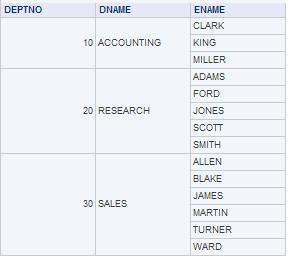
Consider the following table:


But what you really want is this:

Or even better sorted alphabetically

This document describes how you can achieve this in OBIEE against an Oracle DB

2 Stragg function
This solution is based on Tom Kite’s original String Aggregation function found here:
http://www.sqlsnippets.com/en/topic-11591.html

To implement this function in OBIEE your first have to bring the function to the database. Either in the data-schema or in your custom OBIEE function schema. If you do the later be sure that the OBIEE function schema has direct select rights granted on the data-schema tables and views. Grant an execute on the STRAGG function to public. It’s also very handy to create a public SYNONYM for the STRAGG function. (CREATE PUBLIC SYNONYM STRAGG FOR SCHEMA_NAME.STRAGG;)

2.1 The STRAGG scripts

2.1.1 The STRAGG object

create or replace type stragg_type as object
(
string varchar2(4000),

static function ODCIAggregateInitialize
( sctx in out stragg_type )
return number ,

member function ODCIAggregateIterate
( self in
out stragg_type ,
value in varchar2
) return number ,

member
function ODCIAggregateTerminate
( self in stragg_type,
returnvalue out
varchar2,
flags in number
) return number ,

member function
ODCIAggregateMerge
( self in out stragg_type,
ctx2 in stragg_type
)
return number
);
/

2.1.2 The STRAGG type body

create or replace type body stragg_type
is

static
function ODCIAggregateInitialize
( sctx in out stragg_type )
return
number
is
begin

sctx := stragg_type( null ) ;

return
ODCIConst.Success ;

end;

member function ODCIAggregateIterate
( self in out stragg_type ,
value in varchar2
) return number
is
begin

self.string := self.string ',' value ;

return
ODCIConst.Success;

end;

member function ODCIAggregateTerminate
( self in stragg_type ,
returnvalue out varchar2 ,
flags in number
) return number
is
begin

returnValue := ltrim( self.string,
',' );

return ODCIConst.Success;

end;

member function
ODCIAggregateMerge
( self in out stragg_type ,
ctx2 in stragg_type
)
return number
is
begin

self.string := self.string
ctx2.string;

return ODCIConst.Success;

end;

end;
/

2.1.3 The STRAGG function

create or replace function stragg
( input varchar2 )
return varchar2
deterministic
parallel_enable
aggregate using stragg_type
;
/
3 OBIEE Usage
These function work both from the repository as directly from the reports.
3.1 Unsorted

EVALUATE_AGGR( 'STRAGG(%1)' as varchar(200), EMP.ENAME)

3.2 Sorted


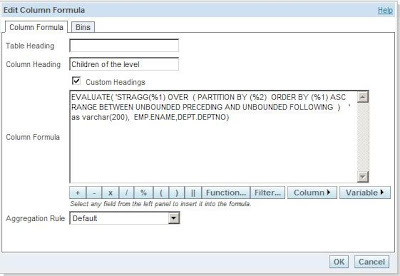
EVALUATE( 'STRAGG(%1) OVER ( PARTITION BY (%2) ORDER BY (%1) ASC RANGE BETWEEN UNBOUNDED PRECEDING AND UNBOUNDED FOLLOWING ) ' as varchar(200), EMP.ENAME,DEPT.DEPTNO)

3.3 Distinct
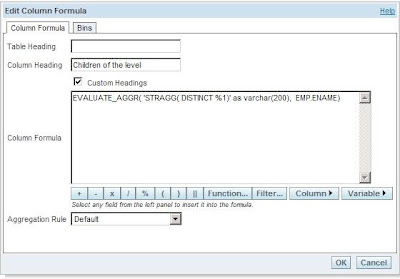
EVALUATE_AGGR( 'STRAGG( DISTINCT %1)' as varchar(200), EMP.ENAME)

Till Next Time

This article was original written for the Ciber knowledge Blog:
http://knowledge.ciber.nl/weblog/?p=125