____________________________
2011/08/26: Update
-- This article is based on OBIEE10g technology
-- In the original text from 2008/07/27 there was a typo in the example:
MAX_CACHE_ENTRIES = 80000 should read MAX_CACHE_ENTRIES = 800
Some of you copied the example without reading the text. This can lead to a server crash a described in tech note 1340621.1. Especially on a clustered environment.
“It appears that the "purge process" was not able to purge excessive number of cache entries. OBI Server crashes when you attempt to do so.”
It will also generated log entry like:
[47041] NQSConfig.INI warning: The value of MAX_CACHE_ENTRIES is currently 10000 and exceeds the recommended limit of 1200.
Please check any numbers against common sense and the rule of thumbs described in this article.
Till Next Time
Thnx to Stijn Gabriels for noticing and reporting this error on the blog.
____________________________
Some remarks upfront:
- OBIEE is NOT a database. It’s a tool to plough trough multidimensional data out of a data warehouse or datamart.
- OBIEE is NOT an extraction tool. It’s not designed to extract 100k+ rows to a CSV or XLS file.
- OBIEE reports returning more then 1000 rows are often use as source for other tools (like Excel) and don’t contain any information for the user without having him/her plough trough the data manually. (consider using BI-publisher instead)
- OBIEE caching is NOT in memory! It’s a file based system.
How does the OBIEE cache work?
The program first hashes the request string, looks in the cache directory is there is already a valid file present, if not it will execute the request against the database.
If you have a close look at your cache directory you will see that there it’s collection of “.TBL” files. If you open the file in an editor you will recognize things like, user, repository, execute request and of course the resulting data.
Cache entries will become "personal" if you have row level security inside OBIEE. One other reason for a cache entry to become personal is when you have a VPD (Virtual Private Database) in place. A good posting on this subject can be found here: http://obieeblog.wordpress.com/2008/12/29/obiee-and-virtual-private-database-vpd/
Since all the cache is written to disk, the cache directory needs to be on the quickest drive available preferable with its own disk controller.
Before we go in to detail over the possible cache settings we first have to ask ourselves what the valid reasons to use the OBIEE cache are.
- The user executes the same request over and over within the “valid” period of the cache.
- The result of the request is the rollup of a large amount of underlying data. But if the rollup level is greater then 1 to 100 you really should go back to your data warehouse design.
Caching a report because “it takes to long” is usually a sign that your data warehouse or data mart doesn’t meet the user requirements.
The parameters for the cache management can be found in NQConfig.ini.
ENABLE
To enable the cache set the ENABLE parameter to YES.
DATA_STORAGE_PATHS
This parameters specifies one or more directory paths for where the cached query results data is stored and are accessed when a cache hit occurs. The maximum capacity in bytes, kilobytes, megabytes or gigabytes. The maximum capacity for each path is 4 GB. For optimal performance, the directories specified should be on high performance storage systems.
Each directory listed needs to be an existing, fully-qualified, writable directory pathname, with double quotes ( " ) surrounding the pathname. Specify mapped directories only.
UNC path names (“\\server.name.edu\somefolder“) and network mapped drives are allowed only if the service runs under a qualified user account. To change the account under which the service is running, see the corresponding topic in the Oracle Business Intelligence Enterprise Edition Deployment Guide.
Specify multiple directories with a comma separated list.
When you specify more than one directory, they should reside on different physical drives. (If you have multiple cache directory paths that all resolve to the same physical disk, both available and used space may be double-counted.)
Example: DATA_STORAGE_PATHS = "d:\OracleBI\cache" 256MB, “f:\OracleBI\cache" 256MB ;
OBIEE fills uses these directories alternating, request 1 goes to first directory, request 2 goes to second directory, request 3 goes to first directory etc.
some notes:
- Don’t make a directory larger than 4 GB, this caused by the fact that some of the OBIEE core products are VC++ based which uses an unsigned 32 bit integer for the memory allocation.
- Enable usage tracking to see which reports hit the cache or eat your resources.
- Working with an organization of 8000 users who run an average of 10 personal and or shared reports during the cache valid period (average cache entry size 10 KB), I have never seen the total allocated cache space become more then 1 GB during a 6 months monitoring period. If you really need a cache allocation of more then 2GB there is probably something seriously wrong with your DWH or DM.
- Invest in one or more small high-speed disks with low access times and large cache memories. Give the drive(s) its/their own controller. If your are on a SAN ask your SAN system manager to give you a high priority access drive, so you don’t have to “wait”. You might want to consider creating an "in memory" drive.
- An Oracle Business Intelligence Server defined as a clustered server does not share cached data. The DATA_STORAGE_PATHS entry needs be unique for each server defined as a cluster participant.
- Specifying more than one directory per drive does not improve performance, because file input and output (I/O) takes place through the same I/O controller. In general, specify only one directory per disk drive. Specifying multiple directories on different drives may improve the overall I/O throughput of the OBIEE Server internally by distributing I/O across multiple devices.
- Seeding the OBIEE cache with large tables (more then 1MB) as source for relative small requests ( less then 50kb) force OBIEE to do a full file read for every request. Most modern databases have large shared pools and can do much quicker this read from memory.
- Most datacentres have dedicated VLAN's for communication between databases and OBIEE. Most of these connections are much quicker then reading from disk.
MAX_ROWS_PER_CACHE_ENTRY
Specifies the maximum number of rows in a query result set to qualify for storage in the query cache. Limiting the number of rows is a useful way to avoid using up the cache space with runaway queries that return large numbers of rows. If the number of rows a query returns is greater than the value specified in the MAX_ROWS_PER_CACHE_ENTRY parameter, the query is not cached. When set to 0, there is no limit to the number of rows per cache entry.
Default: MAX_ROWS_PER_CACHE_ENTRY = 100000 ;
Setting this any higher makes OBIEE an ETL tool.
MAX_CACHE_ENTRY_SIZE
Specifies the maximum size for a cache entry. Potential entries that exceed this size are not cached. The default size is 1 MB.
Specify GB for gigabytes, KB for kilobytes, MB for megabytes, and no units for bytes.
Example: MAX_CACHE_ENTRY_SIZE = 1 MB ; Altering this value should be done in conjunction with the setting of MAX_ROWS_PER_CACHE_ENTRY.
MAX_CACHE_ENTRIES
Specifies the maximum number of cache entries allowed in the query cache. Limiting the total number of cache entries provides another parameter with which to manage your cache storage. The actual limit of cache entries might vary slightly depending on the number of concurrent queries. The default value is 1000, maximum recommended by oracle = 1200 (higher is allowed, but don’t go overboard). Example: MAX_CACHE_ENTRIES = 1000 ;
Rule of thumb: Average number of ‘UNIQUE’ (personal and shared) reports run per “cache period” * Average ‘drill’ depth * (number of VPD users )
POPULATE_AGGREGATE_ROLLUP_HITS
Specifies whether to aggregate data from an earlier cached query result set and create a new entry in the query cache for rollup cache hits. The default value is NO.
Typically, if a query gets a cache hit from a previously executed query, then the new query is not added to the cache. A user may have a cached result set containing information at a particular level of detail (for example, sales revenue by ZIP Code). A second query may ask for this same information, but at a higher level of detail (for example, sales revenue by state). The POPULATE_AGGREGATE_ROLLUP_HITS parameter overrides this default when the cache hit occurs by rolling up an aggregate from a previously executed query, in this example, by aggregating data from the first result set stored in the cache. That is, Oracle BI sales revenue for all ZIP Codes in a particular state can be added to obtain the sales revenue by state. This is referred to as a rollup cache hit.
Normally, a new cache entry is not created for queries that result in cache hits. You can override this behaviour specifically for cache rollup hits by setting POPULATE_AGGREGATE_ROLLUP_HITS to YES.
Non rollup cache hits are not affected by this flag. If a query result is satisfied by the cache—that is, the query gets a cache hit—then this query is not added to the cache. When this parameter is set to YES, then when a query gets an aggregate rollup hit (for example, "sales by region" is answered from "sales by district, region") then the result is put into the cache. Setting this parameter to TRUE may result in better performance, but results in more entries being added to the cache.
Example: POPULATE_AGGREGATE_ROLLUP_HITS = YES ;
USE_ADVANCED_HIT_DETECTION
When caching is enabled, each query is evaluated to determine whether it qualifies for a cache hit. A cache hit means that the server was able to use cache to answer the query and did not go to the database at all. The Oracle BI Server can use query cache to answer queries at the same or later level of aggregation (Data Mart Automation).
The parameter USE_ADVANCED_HIT_DETECTION enables an expanded search of the cache for hits. The expanded search has a performance impact, which is not easily quantified because of variable customer requirements. Customers that rely heavily on query caching and are experiencing misses might want to test the trade-off between better query matching and overall performance for high user loads. Example:USE_ADVANCED_HIT_DETECTION = YES;
Reasons Why a Query is Not Added to the Cache:
- Non-cacheable SQL element. If a SQL request contains Current_Timestamp, Current_Time, Rand, Populate, or a parameter marker then it is not added to the cache.
- Non-cacheable table. Physical tables in the Oracle BI Server repository can be marked 'non cacheable'. If a query references any non-cacheable table then the query results will not be added to the cache.
- Cache hit. In general, if the query gets a cache hit on a previously cached query, then the results of the current query are not added to the cache. The exception is query hits that are aggregate roll-up hits.
- Result set is too big.
Query is cancelled. This can happen by explicit cancellation from Oracle BI Presentation Services or the Administration Tool, or implicitly through timeout. - Oracle BI Server is clustered. Queries that fall into the ‘cache seeding’ family are propagated throughout the cluster. Other queries continue to be stored locally. Therefore, even though a query may be put into the cache on Oracle BI Server node 1, it may not be on Oracle BI Server node 2.
MAX_SUBEXPR_SEARCH_DEPTH
The parameter MAX_SUBEXPR_SEARCH_DEPTH allows you to configure how deep the hit detector looks for an inexact match in an expression of a query. The default is 5. At the default level (5), for example, a query on the expression sin(cos(tan(abs(round(trunc(profit)))))) misses on Profit, which is at level 7. Changing the search depth to 7 opens up Profit for a potential hit. Advice set it to 99.
The [CACHE] part from your NQConfig.ini file could now look like this:
#####################################################
#
# Query Result Cache Section
#
#####################################################
[ CACHE ]
ENABLE = YES;
DATA_STORAGE_PATHS = "d:\OracleBI\cache" 1GB, “f:\OracleBI\cache" 1GB ;
MAX_ROWS_PER_CACHE_ENTRY = 10000 ;
MAX_CACHE_ENTRY_SIZE = 1 MB ;
MAX_CACHE_ENTRIES = 1200 ;
POPULATE_AGGREGATE_ROLLUP_HITS = YES;
USE_ADVANCED_HIT_DETECTION = YES;
MAX_SUBEXPR_SEARCH_DEPTH = 99;
If your OBIEE server is in a clustered environment use the following parameters for the “shared” part:
GLOBAL_CACHE_STORAGE_PATH
The physical location for storing cache entries shared across clustering. All clustering nodes share the same location.
Example: GLOBAL_CACHE_STORAGE_PATH = "" SIZE;
MAX_GLOBAL_CACHE_ENTRIES
The maximum number of cache entries stored in the location specified by
GLOBAL_CACHE_STORAGE_PATH.
Example: MAX_GLOBAL_CACHE_ENTRIES = 1000;
CACHE_POLL_SECONDS
The interval in seconds that each node pulls from the shared location specified in
GLOBAL_CACHE_STORAGE_PATH.
Example: CACHE_POLL_SECONDS = 300;
CLUSTER_AWARE_CACHE_LOGGING
Turns on logging for the cluster caching feature. Used only for troubleshooting. The default is NO.
Example: CLUSTER_AWARE_CACHE_LOGGING = NO;
Till Next Time


 It's a simple LOV prompt which returns me 3 presentation variables (dp_cache{0,1}, dp_seed{0,1} and dp_log{0,1,2}.


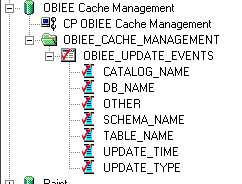 Now assign this table as an event table:
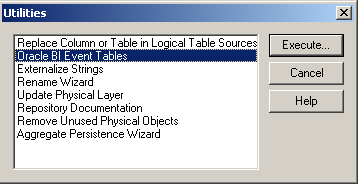 Drag the event table(s) to the right side
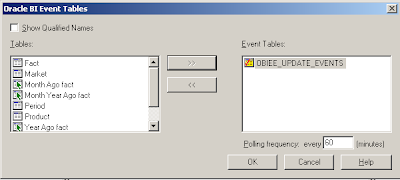 Set the polling frequency, press OK.
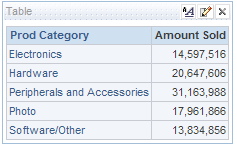 Check if the cache is actually filled:
 Fill the Event table: (Based on the SH schema)
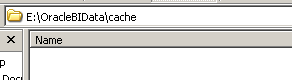 Note 3: OBIEE removes each entry from the EVENT table independent if it was a success or not.


