Showing posts with label SCHEDULER. Show all posts

Monday, December 26, 2011

BIP Quartz tables

On a 11g BIP only install you can use the QUARTZ scheduler. The scheduler is fed from the XMLP_SCHED_JOB table from the repository. It will seed either the QRTZ_SIMPLE_TRIGGERS (one off jobs) or QRTZ_CRON_TRIGGERS (repeating jobs). This will feed the QRTZ_TRIGGERS table which controls the next execution time. The actual job is in the QRTZ_JOB_DETAILS table.

image

You can inject jobs directly into these tables. Remember that all DateTimes are in QUARTZ_TICKS calculated back to GMT time. A ms-sql conversion function DateTime to Ticks can be foud here. From Ticks to DateTime is this one.

Till Next Time

Monday, December 19, 2011

OBIEE11g / BIP Quartz Scheduler

Seems that Oracle is using there own standard for the Date Time format in the BIP quartz scheduler. They are not using standard ticks (starting on 1-jan-0001) but a milliseconds count starting on 1-jan-1970. So 1-Jan-2012 = 1325376000000. IE: a whole day is 86400000 ticks.

Till Next Time

Saturday, August 13, 2011

OBIEE11g Script metadata generation

After deploying your RPD for a couple of time you will have noticed the nice versioning OBIEE does:
image
Problem with this versioning is that you loose your Meta Data Dictionary (MDD) setup every time you deploy a new rpd.
image
Actually this is good since a new RPD should mean that al your changes end up in the MDD. Especially on development systems where updates are done on & off-line, the MDD will soon be out of sync.
Why not set up a job which simple refreshes the old and adds the new onces.
WARNING This script uses the /Command for the admin tool which is NOT supported (or documented Knipogende emoticon )
Let´s start with a VB script:
On Error Resume Next
    Dim fso, folder, files, NewFileP, NewFile, RPDFolder, MDFolder, delfolder, AdminUser, AdminPassword, WshShell
 
    Set fso = CreateObject("Scripting.FileSystemObject")
    'Be sure there is no \ at the end of the repository folder
    if right(Parameter(0),1) = "\" then
        RPDFolder = left(Parameter(0), len(Parameter(0), -1))
        else
        RPDFolder = Parameter(0)
    end if
   
    'Be sure there is no \ at the end of the repository folder
    if right(Parameter(1),1) = "\" then
        MDFolder= left(Parameter(1), len(  MDFolder= Parameter(1), -1))
        else
        MDFolder= Parameter(1)
    end if
   
    AdminUser = Parameter(2)
    AdminPassword = Parameter(3)
   
    Set folder = fso.GetFolder(RPDFolder)
    Set files = folder.Files
 
    For each folderIdx In files
    'loop trough the rpd files
        if right(folderIdx.Name,3) = "rpd" then
            'Delete the "old" meta data
            NewFileP.WriteLine( folderIdx.Name)
            set delfolder = fso.GetFolder(MDFolder&"\"&left(folderIdx.Name,len(folderIdx.Name)-4))
            delfolder.Delete
            Set NewFile = fso.CreateTextFile(RPDFolder&"\nqGenerateMetaData"& left(folderIdx.Name,len(folderIdx.Name)-4) &".txt", True)
            'Add instructions to the \nqGenerateMetaData.txt file
            NewFile.WriteLine( "Open "&  RPDFolder &"\" &left(folderIdx.Name,len(folderIdx.Name)-4) & " " & AdminUser & " "&   AdminPassword & " "&   AdminPassword)
            NewFile.WriteLine( "Hide")
            NewFile.WriteLine( "GenerateMetadataDictionary " & MDFolder & "\" )
            NewFile.WriteLine( "DescribeRepository " & MDFolder & "\"&left(folderIdx.Name,len(folderIdx.Name)-4) & "\REPOS.XML  UTF-8")
            'add the closing commands           
            NewFile.WriteLine( "Close")    
            NewFile.WriteLine( "Exit")
            NewFile.Close   
            'run the script
            Set WshShell = CreateObject("WScript.Shell")
            WshShell.run ( "D:\OBIEE\Oracle_BI1\bifoundation\server\bin\AdminTool.exe /command " & RPDFolder& "\nqGenerateMetaData"& left(folderIdx.Name,len(folderIdx.Name)-4) &".txt")
                       
            Set NewFileD = fso.CreateTextFile("d:\xslcopy" & left(folderIdx.Name,len(folderIdx.Name)-4) &".bat", True)
            NewFileD.WriteLine ( "MD " &  MDFolder & "\" & left(folderIdx.Name,len(folderIdx.Name)-4)& "\xsl")
            NewFileD.WriteLine( "COPY D:\OBIEE_REP\Scripts\MetaDataDictionary\xsl\*.* " & MDFolder & "\" & left(folderIdx.Name,len(folderIdx.Name)-4)& "\xsl")
            NewFileD.close
            WshShell.run ("d:\xslcopy" & left(folderIdx.Name,len(folderIdx.Name)-4) &".bat")
       
        End if
    Next
Put it in a file called “AutomateMetaDir.vbs”
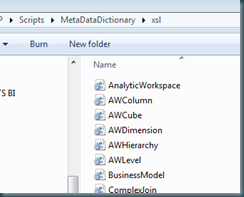
The GenerateMetadataDictionary command in 11g doesn’t created the proper XSL directory from the command line. Create one from a manual export and put it in your script directory so you can copy it when needed.
image
Create a new job to refresh every thing once every x hours.
image
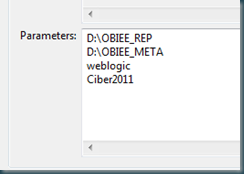
Don’t forget the parameters:
image
Till next time

Tuesday, August 12, 2008

OBIEE Configuring Configuring the scheduler on Windows2003/Oracle

As with many configurations on OBIEE, it's in the documentation only distributed on many PDF's.
Here is how install the OBIEE scheduler on Windows2003 and an Oracle DB.
Basically you have to go trough 5 steps:
1 Create the DB User and Tables.
2 Check the instanceconfig.xml
3 Add the Scheduler Administrator to the credential store
4 Configure the Job Manager
5 Run A test

1 CREATE THE DB USER AND TABLES.
The table scripts can be found in ..\OracleBI\server\Schema\SAJOBS.Oracle.sql, but you have create the user yourself. Or you can use this script:
/*****************************************************************************/
/* Setup OBIEE scheduler on ORACLE */
/* READ THE SCRIPT BEFORE YOU RUN IT !!!!!!!!!! */
/* Run the script as SYSTEM */
/*****************************************************************************/
/*****************************************************************************/
/* Create the S_NQ_SCHED user */
/* You can change the password NOT the user name */
/*****************************************************************************/
DROP USER S_NQ_SCHED;
CREATE USER S_NQ_SCHED IDENTIFIED BY "S_NQ_SCHED_PASSWORD"
DEFAULT TABLESPACE "USERS"
TEMPORARY TABLESPACE "TEMP"
PROFILE DEFAULT
QUOTA UNLIMITED ON "USERS";
GRANT "CONNECT" TO S_NQ_SCHED;
GRANT "RESOURCE" TO S_NQ_SCHED;
GRANT CREATE SESSION TO S_NQ_SCHED;
GRANT CREATE TABLE TO S_NQ_SCHED;
GRANT CREATE VIEW TO S_NQ_SCHED;
ALTER USER S_NQ_SCHED DEFAULT ROLE NONE;

2 Check the instanceconfig.xml
In ..\OracleBIData\web\config you will find the instanceConfig.xml

Check if the entry between Alerts Tags has a ScheduleServer entry. If you run it on an other port then 9705 add it in the form ServerName:PortNumber (MyServer:1234).

3 Add the Scheduler Administrator to the credential store
Open a command line box:
cryptotools credstore -add -infile e:/OracleBIData/web/config/credentialstore.xml
Credential Alias: admin
Username: SchedulerAdmin
Password: SchedulerAdmin
Do you want to encrypt the password? y/n (y): Y
Passphrase for encryption: secret
Do you want to write the passphrase to the xml? y/n (n): Y
File "OracleBIData_HOME/web/config/credentialstore.xml" exists. Do you want to overwrite it? y/n (y): Y


4 Configure the Job Manager
From the file menu select Configuration Options


On the Database tab enter the connection pool date. Always use the native call interface if possible!.


On the General tab enter the administrator name and credentials
Start the scheduler service


You can find the log in: ..\OracleBI\server\Log\
5 Run A test
Create a simple report and press Save And Schedule
Click on the destinations tab an select Oracle BI Server Cache
Save the IBot.
Open a connection with the jobmanager:


Enter the login credentials


Press the refresh button and have a look at the entry:


This article was original written for the Ciber knowledge Blog: http://knowledge.ciber.nl/weblog/?p=124

Till Next Time