Don't do it, it screws up your OBIEE weblogic instance.........
(especially when you are preparing for the Brighton 2012 BI congress.......)
8-(
Till Next Time
Showing posts with label OBIEE 11g. Show all posts
Showing posts with label OBIEE 11g. Show all posts
Sunday, May 6, 2012


Monday, April 23, 2012
OBIEE install avoid RTD license problems
If you are not going to use RTD (Real Time Decisions) uncheck the box during installation:

This avoids extremely difficult discussions with Oracle over the license fee.
Till Next Time
Friday, April 20, 2012
OBIEE 11116 repository on MS-SQL I
We had to do a POC on some MS-SQL data. Instead of bringing an extra Oracle DB we used an existing MS-SQL instance.
1. Create a repository database:
We called ours “Repositories”


2. Enable case-sensitive collation
ALTER DATABASE Repositories COLLATE Latin1_General_CS_AS
3. Enable Row versioning
ALTER DATABASE Repositories SET READ_COMMITTED_SNAPSHOT ON
Monday, February 27, 2012
OBIEE 11.1.1.6 upgrade guide
Upgrade guide is found here:
http://docs.oracle.com/cd/E23943_01/bi.1111/e16452/bi_plan.htm#BABECJJH
Pretty much a standard weblogic upgrade.
Till Next Time
http://docs.oracle.com/cd/E23943_01/bi.1111/e16452/bi_plan.htm#BABECJJH
Pretty much a standard weblogic upgrade.
Till Next Time
Wednesday, February 22, 2012
OBIEE 11.1.1.6 is out!
If you have missed it:
http://www.oracle.com/technetwork/middleware/bi-enterprise-edition/downloads/bus-intelligence-11g-165436.html ==> 11.1.1.6.0 is out
See the nice new features:
http://docs.oracle.com/cd/E23943_01/bi.1111/e10540/whatsnew.htm#CJAEEGJH
Till Next Time
http://www.oracle.com/technetwork/middleware/bi-enterprise-edition/downloads/bus-intelligence-11g-165436.html ==> 11.1.1.6.0 is out
See the nice new features:
http://docs.oracle.com/cd/E23943_01/bi.1111/e10540/whatsnew.htm#CJAEEGJH
Till Next Time
Sunday, February 12, 2012
OBIEE11g FireFox 10 problems
For those of you having problems with the new FireFox 10 client. Michal Novy posted a solution on Christians Blog:
Hi, I found the way how to do a workaround:
1. type "about:config" into an address bar
2. right click anywhere and choose New / String
3. name it "general.useragent.override"
4. put the value "Mozilla/5.0 (Windows; Windows NT 6.1; rv:10.0) Gecko/20100101 Firefox/9.0"
5. refresh OBIEE login screen
Then it works without any problems!
Seems that Oracle is already working on some patches: see patch # 13564003 released by Oracle Support which repairs this limitation.
Till Next Time
Monday, September 5, 2011
OBIEE Calendar Control

Question from the OTN Forum. (Works in 10 & 11g)
Select a YearMonth, YearWeek and Date from your Calendar dimension, select a measure from your facts.
Add a extra column called “Day Of the Week”
CAST(DAYOFWEEK("Time"."T00 Calendar Date") as varchar(2)) || ' - '||DAYNAME("Time"."T00 Calendar Date")
Alter your fact column to:
'<b>'||cast("Time"."T00 Calendar Date" as varchar(10))||'</b>'||'<br><P STYLE="text-align: right;">'||CAST("Base Facts"."1- Revenue" AS varchar(15))
It concats the date with the fact and adds some HTML Formatting
Alter the column properties [data format] to HTML:

Put it all in a pivot view:

Check the results:

Till Next Time
Saturday, August 27, 2011
OBIEE11g Scorecarding Part 6
Look here for:
- Part 1 Vision Document
- Part 2 Mission Statement & Perspectives
- Part 3 Watchlist & Objectives
- Part 4 Goals & Startegy Tree
- Part 5 Startegy Tree Assesment Formula, Initiatives
Besides the strategy tree OBIEE offers the possibility to create and Cause and Effect or Fishbone chart.
Cause and Effect chart:
Go to your strategy objective

In the related items part drag the Causes, Effects and Intiatives

In Scorecard Documents select Create Cause & Effect Map

Drag in the objective you want tot process.

And save the map.
An other feature is the Strategy Map.
Strategy Map:
Scorecard documents >> Strategy Map:

Drag you main objective to the map


Select Add Related Strategy Nodes:

Rearrange them and add extra dependencies

Till Next Time
Friday, August 26, 2011
OBIEE11g Scorecarding Part 5
Look here for:
STRATEGY TREE ASSEMENT FORMULA:
By default the OBIEE strategy is based on a worsted case scenario.

In practise KPI’s are weighted against each other.
Open the top objective pane, locate the assessment formula and change it to weighted

Change the weight of the KPI’s relative to each other

Check the strategy tree:

Let’s create some initiatives:
Initiatives:
“Initiatives are time-specific tasks or projects that are necessary to achieve objectives. As such, you can use initiatives that support objectives as milestones as they reflect progress toward strategy targets”

Click the new document symbol.

Enter the name and description

Add the start and due date

add the KPI’s and pin them if necessary.

Add any key resources for this initiative

Drag the related objectives for this initiative into the related items section

Till Next Time
Thursday, August 25, 2011
OBIEE11g Scorecarding Part 4
If you have read Part 1, Part 2 and Part 3 you will now have a Vision, a Mission, Perspectives, a KPI watch list and a main objective.

Next we need to define the Goals within the main objective.
OBJECTIVE GOALS
Activate “My Main Objective” and press the new document symbol:


Enter the name and description for the Financial Objective

Set the perspective to financial.

Do the same for “Customer”, “Internal Process”, “Learning and Growth” and any additional perspectives.
You can add "tree like” sub objectives if needed:

Now we can add out KPI to our (sub) objective’s:

Click Add KPI’s and select the right KPI


The Same KPI can be used in several branches.
If all the KPI’s and objectives are in place you can create a strategy tree.
STRATEGY TREE
Select the highest level of the scorecard, Scorecard Documents, Create Strategy Tree.


Open all the branches and and save it.
Till Next Time
Wednesday, August 24, 2011
OBIEE11g Scorecarding Part 3
If you have read:
you will now have a Vision, a Mission and Perspectives.

Scorecard Documents >> Create KPI Watchlist
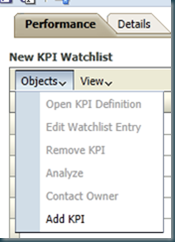
In the performance Tab click on add KPI:
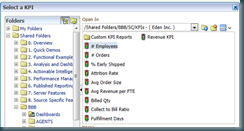
do this for all the KPI’s you want to use:

Leave the hierarchy default

On the details page add a description, set the owner and add related documents

Save it:

Click on the new objective:


Enter the name and description.

Scroll a bit down to set the Business Owner.
Leave all the other fields as is for the moment.
Till Next Time
you will now have a Vision, a Mission and Perspectives.
WATCHLIST:
It’s time to collect al the KPI’s we want to use in our scorecard in a Watchlist:
Scorecard Documents >> Create KPI Watchlist

In the performance Tab click on add KPI:

do this for all the KPI’s you want to use:

Leave the hierarchy default

On the details page add a description, set the owner and add related documents

Save it:

OBJECTIVES:
To full fill our Mission we need at least a main objective. The main objective is the placeholder for the perspective objectives.Click on the new objective:


Enter the name and description.

Scroll a bit down to set the Business Owner.
Leave all the other fields as is for the moment.
Till Next Time
Tuesday, August 23, 2011
OBIEE11g Scorecarding Part 2
In Part 1 we made the vision document, next will make the Mission Statement:
MISSION STATEMENT:

Scorecard Documents >> Create Mission

In the document tab enter a mission. A mission is a road path for your vision. A vision can have several missions.

In the details tab set the Business Owner, references to related documents and a short description.
Save your mission: 
PERSPECTIVES:
There are four standard perspectives that are defined by the Balanced Scorecard Methodology:
- Financial — Groups objectives, initiatives, and KPIs that relate to or support the monetary or economic health and development of your organization.
- Customer — Groups objectives, initiatives, and KPIs that pertain to or support your client base.
- Internal Process — Groups objectives, initiatives, and KPIs that categorize and support your corporate internal policies and procedures.
- Learning and Growth — Groups objectives, initiatives, and KPIs that relate to or support employee training and advancement.
You can add your own perspective if needed:

Enter a Perspective name, Bussines Owner an description

If you want you can add some extra related documentation.
The KPI’s we will add later.

Till Next Time
Subscribe to:
Posts (Atom)