Showing posts with label FILTER. Show all posts

Sunday, August 8, 2010

OBIEE Reverse the filter

Or how to define a between filter based on ONE presentation variable.

Let’s get our prompt and presentation variable:

image

variable is pVarYear

Let’s get a simple report:

image

Giving us:

image

Let’s add the between, first add your variable to a dummy column:

image

Add a filter to that column and set it on between:

image

Add two sql expression with your year column and add the diferences:

image

Remove your dummy column and check the results:

image 

Or simple convert a filter to sql an directly edit it:

image

Till Next Time

Tuesday, January 5, 2010

OBIEE Navigating from report to report

On the forums every so often you see the question: “I want to navigate from report A to report B and pass the value where the user clicks as filter” . This is actually quite simple in OBIEE. Let’s start with a simple  base report showing a list of available markets:

image

Next create a target report containing markets and revenue:

image

Next go back to your base report and open the column properties screen for your “Market” column:

image

Set the navigation target:

image

If you now test the report you will see that the clicked value isn’t passed as filter

image

This is because the report isn’t let “filter” aware. Go to your target report and set a filter on the “Market” column of the type is prompted.

image

If you now test it again, you will see the filter value is passed:

image

Till Next Time

Thursday, December 17, 2009

OBIEE Making an OR filter

Question I got from the blog, how to make an or filter in OBIEE.

Say you want the revenue for 2008 or the 2007 Q1. First make your report including the filters:

image

Next click “AND” image to change into OR image . This way you can make complex filters:

image

Till Next Time

Wednesday, April 1, 2009

OBIEE Between prompt using the calendar control

Sometimes you need a between prompt on a date but the fields but you can't use the normal is between because of the complex filter. Here is a possible workaround. In the repository create a dummy table called Dates with two columns Date1 and Date2 based on the current date.

image

Next create a prompt and put the result in two presentation variables:image

Next create the complex filter:

image

Till Next Time

OBIEE Dynamic prompt content

In a recent article: http://obiee101.blogspot.com/2009/02/obiee-switching-between-filters.html I showed you how to create dynamic filters. This time I want to show you on of the ways to create dynamic prompt content. First create a small dropdown prompt which contains a FilterName LOV:

image

Thursday, November 20, 2008

OBIEE Understanding Outerjoins Part 2

In a previous article I showed the basics of working with OBIEE Outerjoins: (http://obiee101.blogspot.com/2008/11/obiee-understanding-outerjoins-part-1.html).
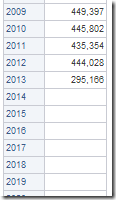
image

This works fine until you add a filter :

image

image

From the log:

select T26.D_YEAR as c1,
     sum(T31.F_FACT_VAL) as c2
from
          DIM_YEAR_MONTH_DAY T26 left outer join
          F_FACTS T31 On T26.D_YEAR_MONTH_DAY = T31.D_DATE
group by T26.D_YEAR
having 440000 < sum(T31.F_FACT_VAL)
order by c1

This "kills" the outerjoin.... I hear think why not add "OR IS NULL". Let's do that:

image 

image

From the log:

select T26.D_YEAR as c1,
     sum(T31.F_FACT_VAL) as c2
from
          DIM_YEAR_MONTH_DAY T26 left outer join
          F_FACTS T31 On T26.D_YEAR_MONTH_DAY = T31.D_DATE
group by T26.D_YEAR
having 440000 < sum(T31.F_FACT_VAL) or sum(T31.F_FACT_VAL) is null
order by c1

We still  are missing a couple off years.

Let try an in view filter: change F_FACT_VAL to:

CASE WHEN SUM(F_FACTS.F_FACT_VAL by DIM_YEAR_MONTH_DAY.D_YEAR )> 440000 then SUM(F_FACTS.F_FACT_VAL by DIM_YEAR_MONTH_DAY.D_YEAR ) else NULL end

image

This give us all the years back:

image

From the log:

SET VARIABLE QUERY_SRC_CD='Report';SELECT DIM_YEAR_MONTH_DAY.D_YEAR saw_0, CASE WHEN SUM(F_FACTS.F_FACT_VAL by DIM_YEAR_MONTH_DAY.D_YEAR )> 440000 then SUM(F_FACTS.F_FACT_VAL by DIM_YEAR_MONTH_DAY.D_YEAR ) else NULL end saw_1 FROM BM_OUTER_JOIN ORDER BY saw_0

select T26.D_YEAR as c1,
     sum(T31.F_FACT_VAL) as c4
from
          DIM_YEAR_MONTH_DAY T26 left outer join
          F_FACTS T31 On T26.D_YEAR_MONTH_DAY = T31.D_DATE
group by T26.D_YEAR
order by c1

As you can see OBIEE did the case when logic internally.

Till Next Time

This article is orignally written for the ciber knowledge blog:

Monday, July 28, 2008

OBIEE Protect Filter

I had to make demo on protecting filters for a small class I gave.
Let's start with a simple report against the SH repository:

Put in a basic OR filter
Have a look a the result:
Make a basic prompt:
Put it all on a dashboard: Select the year 2000:

You will see that you loose the "OR" function.
Now go back to your report on the first filter part check the Protect Filter option:

Save your report and go back to the dashboard. Select the year 1999 and press go.
You will see that the "OR" part stays intact.
Now go back to your report on the second filter part check the Protect Filter option:
Save the report and go back to your dashboard. Whatever year you select the result will not change.
Till Next Time