By default the bottom scale on a timelin graph is set to automatic. The OBIEE interface doesn't allow you to influence it. Of course we found a workaround. You can do this by altering the PCXML file. The scale is controlled by the tags in the ValueScale Position='Bottom' part. Try playing around with ManualTicksMajor='Quarter' and ManualTicksMinor='Month' . Possible values are 'Year', 'Quarter', 'Month', 'Week', 'Day', 'Hour', 'Minute'.
Till next time
Saturday, August 9, 2008


Friday, August 8, 2008
OBIEE Migrating Oracle BI Discoverer to OBIEE
OBIEE can convert your discoverer EEX files to OBIEE .RPD files. The manual for this can be found on your OBIEE 10.3.4.0 server in ..\OracleBI\server\Document\DiscovererMetadataConversionAssistant.pdf. I did some prelimanary testing with and it seems to work just fine.
Till Next Time
Till Next Time
OBIEE customising your PCXML
Altough NOT supported by Oracle you can do a lot of customizing of your PCXML files. These file control the appearance of your Charts and craphs in OBIEE.
Some documentation can be found on your OBIEE server: ..\OracleBI\corda50\docs\graph_reference\graph_reference.pdf
Till Next Time
Some documentation can be found on your OBIEE server: ..\OracleBI\corda50\docs\graph_reference\graph_reference.pdf
Till Next Time
OBIEE Date Time Scatter graph
In OBIEE 10.3.4.0 Oracle gave us the date time graph. Of course we want more :-) Here is how you can make a Date Time scatter graph by editing the PCXML.
WOW: Before you start doing any editing like this BACK UP BACK UP BACK UP. Because if it goes wrong it can really F*#@$">F*#@$ your system.
Step 1: Copy the linetime.cxml file to linetimescatter.cxml. This file can ussaly be found in ..\OracleBI\web\app\res\s_oracle10\charts
Step 2: Copy the timeline.pcxml to timelinescatter.pcxml. This file can ussaly be found in ..\OracleBI\web\app\res\s_oracle10\popbin
Step 3: In the custommessages folder for the language add the following to the custommessages.xml file (create the folder and file if they don't exsist!)
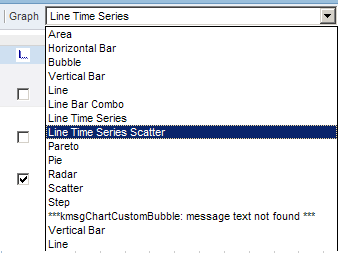

WOW: Before you start doing any editing like this BACK UP BACK UP BACK UP. Because if it goes wrong it can really F*#@$">F*#@$ your system.
Step 1: Copy the linetime.cxml file to linetimescatter.cxml. This file can ussaly be found in ..\OracleBI\web\app\res\s_oracle10\charts
Step 2: Copy the timeline.pcxml to timelinescatter.pcxml. This file can ussaly be found in ..\OracleBI\web\app\res\s_oracle10\popbin
Step 3: In the custommessages folder for the language add the following to the custommessages.xml file (create the folder and file if they don't exsist!)

Step 4: Edit the linetimescatter.cxml file
set displaynameref="kmsgChartTimeSeriesScatter"
set sawc:engineSpecific file="popbin/timelinescatter.pcxml"
Save and close the file
Step 5: Edit the timelinescatter.pcxml file
set Graph Name="graph" Type="Time" SubType="Scatter"
Save and close the file
Step 6:
restart the Java-host and the prestationserver.
Till Next Time
OBIEE Continues Date Time Line redux
Remeber this entry: http://obiee101.blogspot.com/2008/03/obiee-continues-time-line.html ?
Well they fixed it in OBIEE 10.3.4.0. Yes OBIEE finanally has a date time aware grahtype. No more:
Well they fixed it in OBIEE 10.3.4.0. Yes OBIEE finanally has a date time aware grahtype. No more:
 But real:
Thank you Oracle, this makes OBIEE live a whole lot better!
Okay the inteface is still very basic but you can influence a lot by tweaking the PCXML file for this graph.
Till Next Time

This article is also published on: http://knowledge.ciber.nl/weblog/
Thursday, August 7, 2008
OBIEE 10.3.4.0 is out
Yippie,
You can download the new version of OBIEE.
Update 1: Loads of new stuff, Finaly a DATE TIME aware graph!!!!!!!!!!!!!!!!!!
see: http://download.oracle.com/docs/cd/E10415_01/doc/bi.1013/e10416.pdf
Till Next Time
You can download the new version of OBIEE.
Update 1: Loads of new stuff, Finaly a DATE TIME aware graph!!!!!!!!!!!!!!!!!!
see: http://download.oracle.com/docs/cd/E10415_01/doc/bi.1013/e10416.pdf
Till Next Time
Subscribe to:
Posts (Atom)