Somtimes your OC4J is really stuck, and if you to give a shutdown without resestting your server try:
"{JDK HOME here}\bin\java.exe" -jar {ORACLE_BI home here}\oc4j_bi\j2ee\home\admin.jar ormi://localhost:23791 {OC4JADMIN password here} -shutdown force
Till Next Time
Thursday, August 28, 2008


Wednesday, August 27, 2008
OBIEE Conditional X-axis graph
One of our customer had a unique request. If the selected period becomes longer then a predifinend period, the x-axis should switch from item 1 to item 2 without user intervention! Here is how we did it:
First create the conditonal x-axis: (Sales sample)
 Next alter the Y value so that it will follow the X - axis:
Add everthing to a dashboard:
15 days:
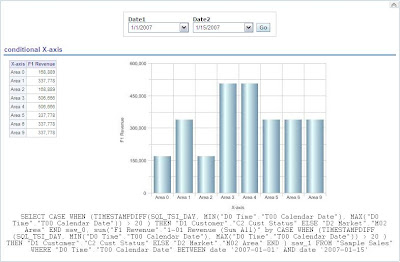
25 days:

Till Next Time
First create the conditonal x-axis: (Sales sample)
CASE WHEN (TIMESTAMPDIFF(SQL_TSI_DAY, MIN("D0 Time"."T00 Calendar Date"), MAX("D0 Time"."T00 Calendar Date")) > 20 ) THEN "D1 Customer"."C2 Cust Status" ELSE "D2 Market"."M02 Area" END
Next alter the Y value so that it will follow the X - axis:sum("F1 Revenue"."1-01 Revenue (Sum All)" by CASE WHEN
(TIMESTAMPDIFF(SQL_TSI_DAY, MIN("D0 Time"."T00 Calendar Date"), MAX("D0 Time"."T00 Calendar Date")) > 20 ) THEN "D1 Customer"."C2 Cust Status"
ELSE "D2 Market"."M02 Area" END )

Add everthing to a dashboard:
15 days:
25 days:
Till Next Time
Friday, August 22, 2008
OBIEE scripting user into the repository
On the OTN forum today there was a question about how to script a new user into the repository: http://forums.oracle.com/forums/thread.jspa?threadID=697646&tstart=0
The only way I know is using the nQUDMLExec.exe
First create a txt file with your new users:

DECLARE USER "NewUser" AS "NewUser" UPGRADE ID 1 FULL NAME {New User} PASSWORDThe password can only be entered encrypted, this string is for "welcome1".
'D7EDED84BC624A917F5B462A4DCA05CDCE256EEEEEDC97D54A286E822D97C35C7AD5C43AD4F2A09EAC4D07C3A079829F'
PERIODICITY 90 HAS ROLES ( "Administrators", "XMLP_ADMIN" ) DESCRIPTION
{password = welcome1} PRIVILEGES ( READ);
Next you have to "merge" the txt file into the reopsitory:

E:\OracleBI\server\Bin>nQUDMLExec.exe -U Administrator -P Administrator -I E:\temp\NewUser.txt -B E:\temp\paint.rpd -O e:\temp\newrep.rpd

Check the new repository!
Till next Time
Thursday, August 21, 2008
OBIEE Change the password
Found this one on the blog of Jose Troya (http://oracleintelligence.blogspot.com/2008/08/obiee-enable-users-to-change-passwords.html) It's in Spanish so I translated it into English.
If you don't a security model like LDAP in place, all the users and there passwords are stored in the repository. Wenn you want your users to be able to change there own password from there browers here is how you do it:
Step 1: Create a new entry in your customMessage.xml:

Be sure it's in your customMessage folder. You can cut and paste this message from the controlmessages.xml file found in the ..\OracleBI\web\msgdb\messages.
Restart the Oracle BI Server, Web server, and WWW services in that order.
Restart the Oracle BI Server, Web server, and WWW services in that order.


OBIEE Conditional Hyperlink
A customer wanted a conditional hyperlink.
If the turnover was greater then 100000 it should show a hyperlink else only the number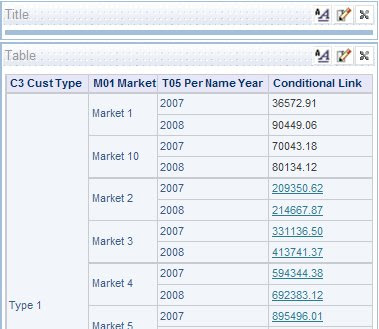
Till Next Time
Here is how we did it:
 CASE WHEN ("F1 Revenue"."1-01 Revenue (Sum All)"> 100000 )THEN '{a href=http://www.google.com }'CAST("F1 Revenue"."1-01 Revenue (Sum All)" as VARCHAR(10)) '{/a}' else CAST( "F1 Revenue"."1-01 Revenue (Sum All)" as VARCHAR(10) )END
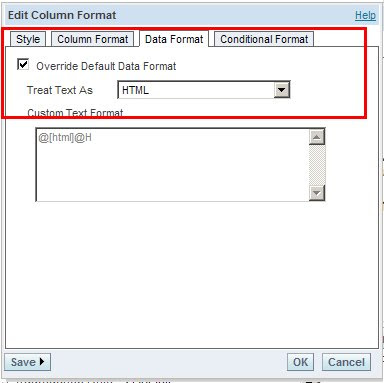
Don't forget to set the column data type settings:

Till Next Time
Wednesday, August 20, 2008
OBIEE Back One Page
Found an intresting one on the OTN forum today:
You can make your own "Go Back One Page" button by adding a textpart to your dashboard section:

{input type="button" value="Go Back One Page" onclick="history.back();"}
For a clear button have look here:
Till Next Time
Subscribe to:
Posts (Atom)